How do I read analog calipers?
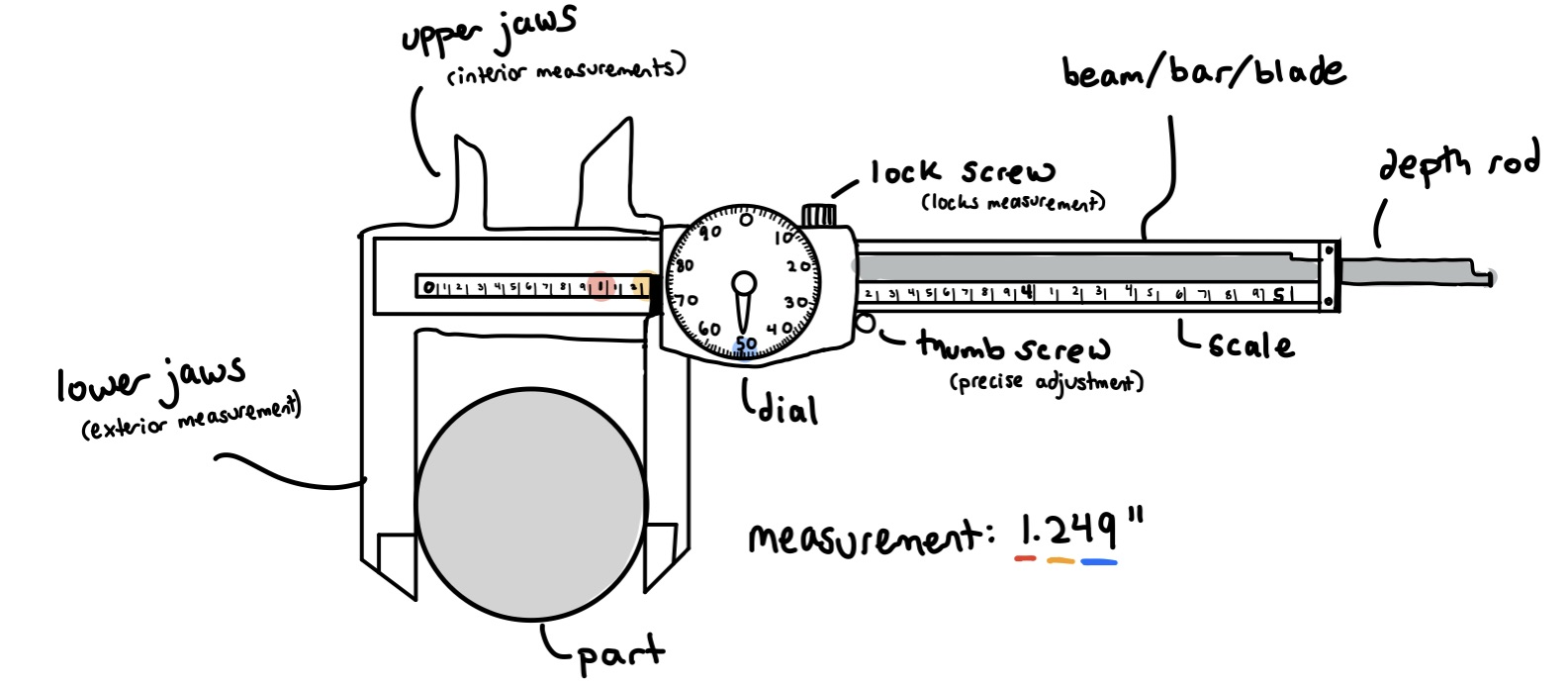
Dial calipers consist of a ruler-like shaft called a blade (also called a beam or bar) and a dial on a slider. Before measuring, make sure that the calipers fit snugly around the part by tightening the thumbscrew near the bottom of the dial – but don’t squeeze too hard! The thumbscrew tightens the jaws and extends the depth rod in very small increments, ensuring finer precision and making it harder to over-squeeze your part.
You can then read the measurement by first looking at the blade, and then the dial. Along the blade, there is one bold number for every nine fine numbers. The biggest bold number to the left of the dial is the first digit in your measurement, and represents how many inches across the feature is. The tenths place is indicated by the fine number closest to the left side of the slider. If the pointer does not point to a fine number, but rather a bold one, the digit in the tenths place would be 0. Finally, you look at the dial. The dial itself ranges from 0 to 99 and offers precision to 1/1000 of an inch, encompassing the hundredths and thousandths places. For example, if the shaft reads 0123456789112← and the dial reads 49, the measurement would be 1.249”.
If you would like to remove the calipers in order to read the measurement, you can do so by tightening the lock screw near the top of the dial. This keeps the calipers in the same configuration, so you don’t need to worry about the jaws sliding out of place.
For more on analog calipers, read here.